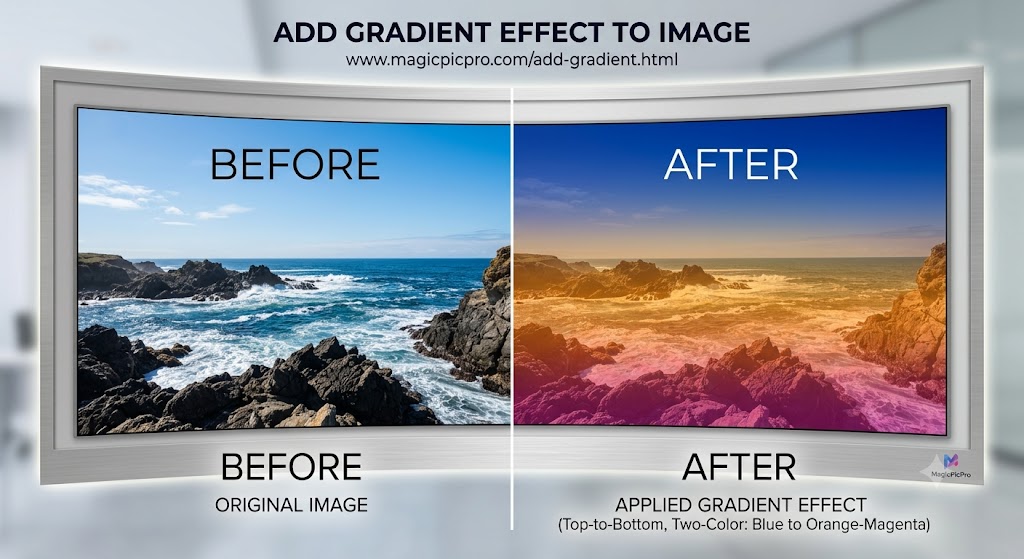
Adding a gradient effect can completely transform the look of an image, taking it from a flat, raw photograph to a professional, stylized piece with depth and character. This powerful technique is a favorite among photographers, graphic designers, and social media content creators.
What is a Gradient Effect?
A gradient is a gradual blend between two or more colors. When applied to an image as an overlay, it blends its colors with the pixels beneath, creating a smooth, stylized color cast. Unlike a simple solid color filter, a gradient allows you to create complex, artistic looks by defining how one color transitions into another. For example, a gradient that shifts from cool blue to warm orange can simulate a powerful sunrise or sunset.
Step-by-Step Guide: Adding a Gradient to Your Image
- Upload Your Image — Navigate to the Add Gradient tool on MagicPicPro. Drag and drop your file directly into the designated area. Supports PNG, JPG, WebP, and GIF. Your images are processed locally on your device — maximum privacy and instant speed.
- Select Add Gradient in Tool Options — Once your image is loaded, find and select the Add Gradient effect from the Tool Options sidebar.
- Configure the Gradient — Choose your gradient direction (e.g. Top-to-Bottom), pick Color 1 (start color, such as deep sapphire blue) and Color 2 (end color, such as vibrant magenta-orange). Adjust opacity so the original image texture shows through beautifully beneath the color veil.
- Preview and Download — See an instant preview on your canvas. Once happy with the blend and colors, click Apply Gradient, then Download to save your stylized image in your preferred format.
The Result: An Incredible Transformation
In our example, a coastal landscape transforms from a plain photograph into a captivating, high-fashion art piece. The top-to-bottom gradient casts deep sapphire blue over the upper atmosphere while warm orange and rich magenta wash over the horizon, water, and rocky foreground — yet the original textures remain crisp throughout.
For this specific look, we applied a top-to-bottom, two-color linear gradient moving from deep sapphire blue to a rich magenta-orange at semi-transparency. This is a professional-grade effect you can create in seconds.
Ready to stylize your photos?
Try Add Gradient — Free