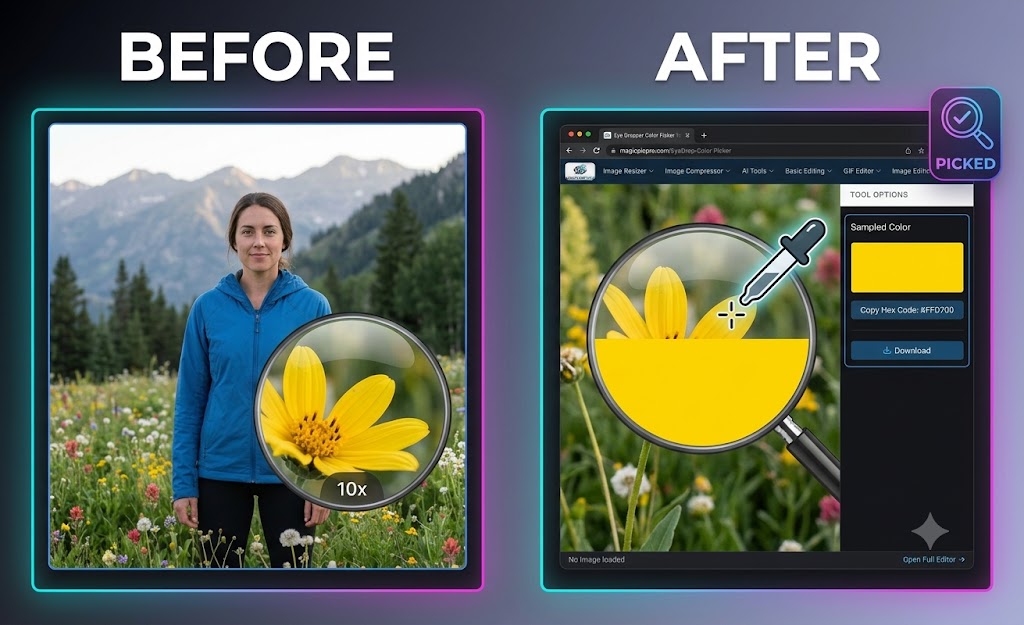
Matching brand guidelines, picking complementary colors, or grabbing precise hex codes from photographs no longer requires heavy graphic design software. Whether you are a web designer, digital artist, or content creator, extracting exact pixel colors directly inside your browser keeps your design workflow fast and efficient.
With the MagicPicPro Eye Drop Picker, you can sample any pixel from your images with absolute precision and copy hex codes instantly — completely free, with zero account sign-ups or software downloads.
Step-by-Step Guide: How to Sample Colors from Any Image
- Upload Your Image — Drag and drop your PNG, JPG, WebP, or GIF photo into the MagicPicPro Eye Drop Picker canvas.
- Select the Eyedropper Tool — Activate the eye drop controls to zoom in and target exact pixels across your photo.
- Sample Your Target Pixel — Hover over any element — such as a wildflower, landscape, or product — and click to select the exact pixel color.
- Copy Your Hex Code — View the live color preview swatch and click the copy button to instantly paste the hex color code into CSS stylesheets or design applications.
Why Use Online Color Sampling?
🎯 Pixel-Perfect Accuracy
Read precise color values across high-resolution photographs with zero quality loss.
🔒 100% Local Privacy
Image edits run locally in your web browser via HTML5 Canvas API — your private photos never leave your device or upload to servers.
🌐 Cross-Platform
Sample colors seamlessly on desktop computers, laptops, tablets, or mobile smartphones without needing third-party browser extensions.
Ready to pick your perfect colors?
Try the Eye Dropper Tool — Free