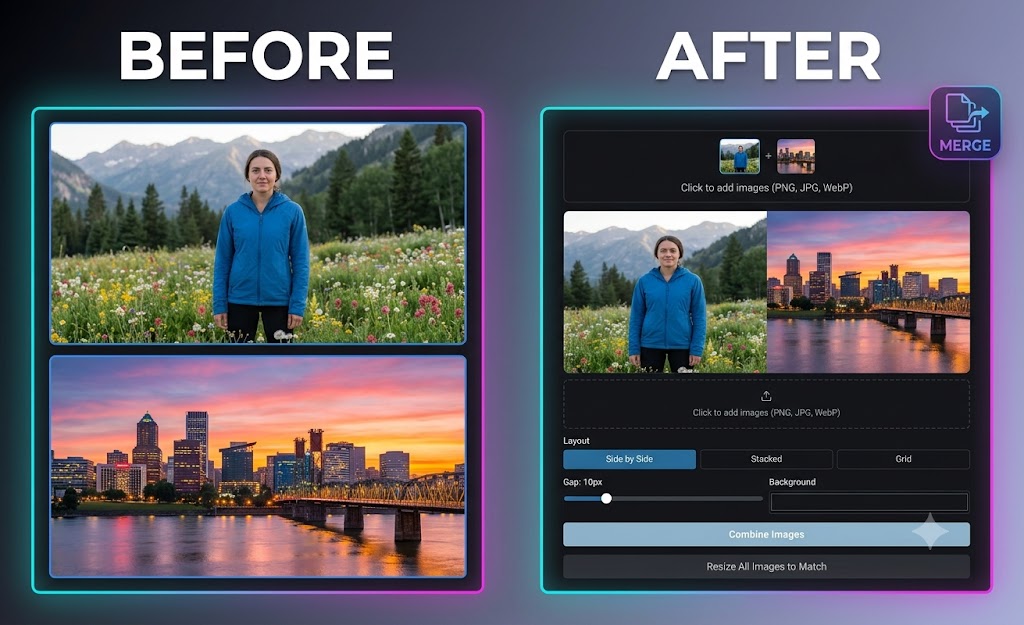
Whether you're creating side-by-side product comparisons, social media collages, or multi-photo graphics, combining multiple images into a single image doesn't require complex editing software.
Using the browser-based MagicPicPro Image Combiner, you can merge photos side-by-side, stacked vertically, or in a grid layout in just a few clicks — completely free, with no account sign-ups or watermarks.
Step-by-Step Guide: How to Merge Your Photos
- Upload Your Images — Drag and drop two or more PNG, JPG, WebP, or GIF files into the MagicPicPro Image Combiner canvas.
- Select Your Layout — Choose between Side by Side (horizontal), Stacked (vertical), or Grid arrangements depending on your display needs.
- Adjust Spacing and Background — Customize the pixel gap distance between images and select a background fill color to frame your combined photo seamlessly.
- Combine & Export — Click the combine button, auto-resize images to match if needed, and save your merged file in high-quality PNG, JPEG, or WebP format with no added watermarks.
Why Use Online Image Combining?
🔒 100% Privacy Protection
Images are processed locally within your web browser — your files never leave your device or get saved to cloud servers.
🖼️ Flexible Layout Controls
Easily mix multiple image formats and adjust spacing or dimensions to get the layout you need.
🌐 Cross-Platform Access
Works seamlessly across desktop computers, tablets, and mobile phones with zero app installations.
Ready to combine your photos?
Try the Image Combiner — Free