AI Photo Colorizer — Colorize Black and White Photos Free
See It in Action
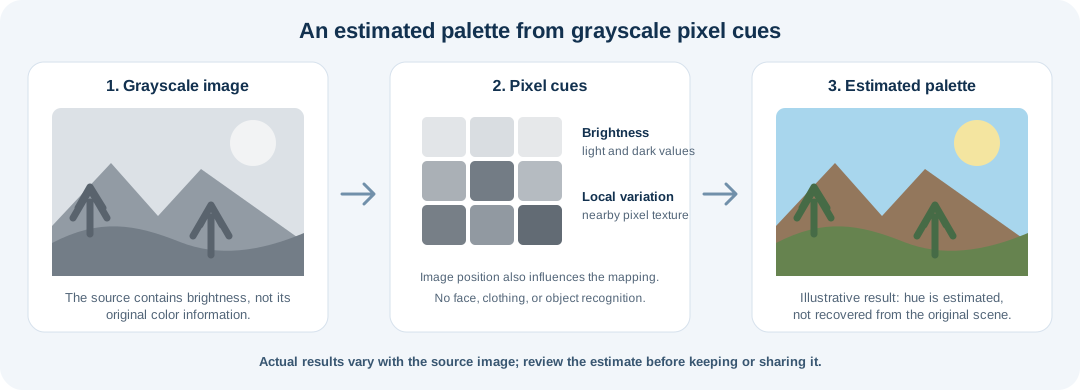
This diagram explains how the browser-based effect maps grayscale pixel cues to an estimated palette. It does not identify objects or recover a photo's original hues.
How It Works
- Upload a grayscale or sepia photo. A clear image with visible contrast gives the pixel-based effect more tonal variation to work with.
- Apply the automatic color effect. The browser uses brightness, nearby pixel variation, and vertical position to assign approximate hues; it does not identify objects.
- Compare and choose. Review the estimate against the original, then reset or undo if the result is not useful. Download only when you are happy with it.
Photo Colorization FAQs
Does this recover the original colors?
No. A grayscale image does not retain its original hues. This effect estimates colors from pixel brightness, nearby variation, and image position.
Does it recognize people, clothes, or scenery?
No. It does not label objects or understand the scene, so it can apply unexpected colors to different regions.
Will it repair scratches or faded details?
No. Colorization changes pixel colors only; it does not remove damage, reduce noise, or reconstruct details missing from the scan.
Is the image uploaded for processing?
No. This page's color effect runs on the image canvas in your browser and does not send the photo to a colorization server.
About This Tool
This browser-based effect applies an estimated palette to grayscale and sepia photos using pixel brightness, local variation, and vertical position. It does not recognize faces, clothing, or scenery and cannot recover original historical colors. Use it as a creative treatment, compare the result with the source, and avoid treating the colors as documentary evidence.
When to Use This Color Effect
Use it to explore a quick color treatment for a grayscale photo or scan. For archival work, label the result as an interpretation and keep the original alongside it; the effect cannot verify the colors of real people, clothing, places, or objects.