Reaction Meme Maker — Create Reaction Memes Free Online
See It in Action
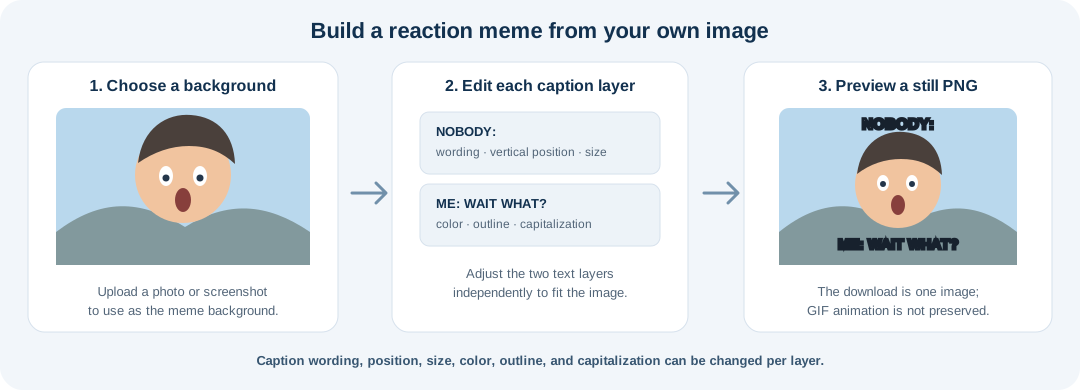
Start with a photo or screenshot, edit the top and bottom reaction captions, and download a still PNG. The editor includes phrase prompts and individual text-layer controls.
About This Tool
Use a photo or screenshot as the background, then edit the default NOBODY: and ME: text layers or start from a phrase suggestion. Each layer can be positioned and styled independently. The tool exports a still PNG rather than an animated GIF.
How It Works
- Upload a photo or screenshot. Choose the image you want to use as the reaction background.
- Edit the reaction captions. Start with NOBODY: and ME: or choose a phrase prompt; customize each line's text, position, size, color, outline, and capitalization.
- Preview and download PNG. Review the still composition and save it as a PNG. An animated GIF input does not stay animated.
Reaction Meme Maker FAQs
Which captions can I start with?
The editor starts with NOBODY: and ME: layers and includes prompts such as ME WHEN, MY FACE WHEN, THIS IS FINE, WAIT WHAT, NO NO NO, and POV:.
Can I move and style captions independently?
Yes. Adjust each text layer's wording, vertical position, size, color, outline, and capitalization.
Does the tool preserve GIF animation?
No. The editor exports a still PNG, so the GIF's other frames and timing are not retained.
What file type does it download?
The finished reaction meme downloads as a PNG image.